Thursday, 30 January 2014

Nexus 5. Made For What Matters.

MORE LIGHT, LESS SHAKE

Nexus 5’s 8 MP OIS camera incorporates advanced technology to shoot vivid imagery with a wide range of color and light intake. And while you’re holding the camera, Optical Image Stabilization will steady the shot even with shaky hands, so your photos and videos will come out sharp and clear.

CAPTURE EXTRAORDINARY MOMENTS

Life is remarkable. Take home the best of it with help from imaging features like HDR+, combining multiple exposures for one perfect shot with vivid daytime and sharp nighttime images—or Photo Sphere, which creates unmatched, immersive 360° views so you can capture and share the full story.

BRINGING EPIC MEMORIES TO LIFE
Google+ makes photos Auto Awesome—automatically creating animations, panoramas, photo collages, and more from the photos you’re already taking.


PRINT WHEREVER, WHENEVER
Now, you can print your favorite shots on the spot—or even your documents, emails, and more with any printer, anywhere in the world.*

* Use any printer that supports Google Cloud Print, or enable your printer by downloading an app from the Play Store.

BRILLIANCE AT YOUR FINGERTIPS

The 5.0" (actual 4.95") Full HD IPS display lets you see details in vivid, lifelike color—making it a great canvas for your best shots. Plus, advanced In-Cell Display technology uses fewer layers, allowing for sharper visuals with less glare and two times faster touch response.
LONG LIVE POWER

Fast 4G LTE and Wi-Fi® connectivity combine with cutting-edge power from the quad-core Snapdragon™ 800 processor and newly envisioned Android™ 4.4 KitKat, so you can race through games, zip around the web, and switch between apps at the flick of a finger. And, do it all throughout the day with a high voltage 2,300 mAh battery.

SIMPLE, MODERN CONTOUR

Precision-built from strong materials, Nexus 5’s minimalistic design provides unique contrast with a sophisticated high gloss front and matte soft-touch rear finish.
ASK ANYTHING

Say “OK, Google” to start a voice search, send texts, get directions, or play music. Then, swipe to check Google Now cards and find the latest information personalized for you.

FIND YOUR WAY

Redesigned Google Maps makes navigating your world effortless. Detect and avoid a traffic jam, explore an unfamiliar town, or uncover a new local favorite—find the top places to eat, shop, play, and more.

MADE FOR SHARING

Google Hangouts brings conversations to life with photos, emoji, and free group video calls. Easily share with friends and family on Google+ or other social media.

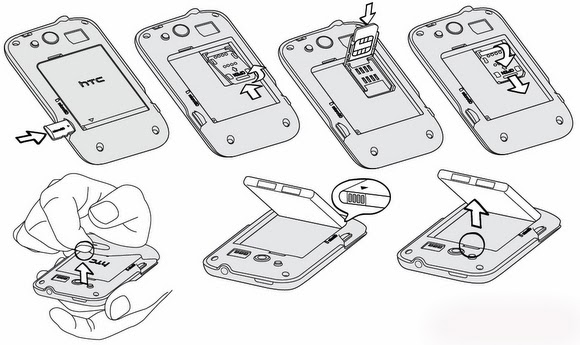
Download User Manual PDF Free HTC Wildfire S (HTC PG76110)

What we mean by uploading and embedding images tutorial on how to open the case / cover, how to insert a microSD or SIM card installed, and how the battery assembly Wildfire down, just wanted to let you know a brief overview of the manual with a picture. Full explanations and step-by-step guide to do this can be found in the Manual / User Guide Users of the HTC Wildfire S (english version) on page 10 to page 15.


We give you some alternate download link HTC Wildfire S (the UK, France, France with Vodafone operators, Italian, German and Spanish as well). It also consists of two types Manual: User Guide (Full Complete) and Quick Start Guide (Quick guide).
HTC Wildfire S for Virgin Mobile Manual
HTC Wildfire S for MetroPCS Manual


HTC Wildfire S for US Cellular Manual


HTC Wildfire S for T-Mobile Manual


For others Languages such as Dutch, Arabic, Danish, Czech, Portuguese, Russian, Romania, Swedish, Chinese, Polish, Nowegian, Greek, Hongarian, Finish, Slovak, you can get it from this official User Guide of HTC Wildfire page. Enjoy!

Download User Manual PDF Free HTC Wildfire

About the User Manual and also the Quick Start Guide of Wildfire by HTC you can learn how to use the features available in HTC wildfire. Learning how to use WiFi IEEE 802.11 b / g to connect the Phone to the Wireless Internet Connection (Hot Spot), Audio Playing Music with Music Player that supported aac,. Amr,. Ogg,. M4a,. Mid,. Mp3,. Wav ,. wma (Windows Media Audio 9), using Facebook, Twitter, Flickr and also Youtube Application, Playing Video formats for .3 gp, .3 g2,. mp4,. wmv, using Google Maps with internal GPS receivers, Troubleshooting and setup operations, setting and setup, assembling the microSD tutorials, and many more.

Download User Manual PDF Free HTC Windows Phone 8S

 Before you download and read the full or QSG UG, here some parts of the tutorial is available in PDF files. This is how you can insert a SIM card and microSD card. There is also how you can open
the bottom cover and charge the battery.
For the PDF Manuals, get them at the links below:

Download User Manual PDF Free HTC Windows Phone 8XT for Sprint

For a quick tutorial, the pictures below will help you to figure out how to open the back cover of the HTC Windows Phone 8XT, then you can insert the microSIM and / or microSD memory card into the phone.
For the Manual, just click the link below to download it and read it.

Download User Manual PDF Free HTC Windows Phone 8X

Before deciding to download and read the full User Manual / Quick Start Guide of HTC Windows Phone 8X, please see our images embedded below. If you just want to know how to eject the SIM card tray and insert a micro SIM card into the slot, you can get a tutorial to get attention in the image below. It also tells you about how to charge the device.
And for the User Guide and QSG download links, just right click on the link below and click save as.

User Manual PDF Free Samsung Focus 2 SGH-I667

Before you download Spanish or English User Manual Samsung Focus 2, let me explain in a quick way of drawing that we give below. This is a simple tutorial how you can understand and work with this
device for the first time held. Get the parts of the phone box / package and then open case back cover, insert the SIM card, battery assembling, filling and finally turn.

To the point, Here are the 2 available UG for Focus 2 that you can have and download. Enjoy!

User Manual PDF Free Samsung Galaxy 580 GT I5801

Samsung Galaxy 580 Android Phone is Galaxy series by Samsung which is designed specifically for Taiwan, Australia and Hong Kong Region. It used Android Eclair or Android 2.1 Version with Full Touch Screen
User Interface. As you see in the image below, the Galaxy 580 is used Touch Bar (monoblock) with slightly rounded form factor in the four corners of the body. In Hong Kong, Phone is available in two colors, Black and White Color. Screenshots are used by FTF Display Phone with 3.2 inches (3.2 ") in diameter and has a resolution of 240 x 400 pixels.

For camera mounted on the Samsung Galaxy 580 is a 3.0 Megapixel Camera which is also included with Digital Zoom, Video Recording (Camcorder), Image Editor, etc. Cam Tool. Galaxy 580 also has a music player that supports aac, amr, mp3, ogg, wma, mid, AAC +, eAAC +, smf, XMF, iMelody, amr nb, amr wb codec and format. Of course since GT I5801 is a Android phone, the majority of Google Mobile Services has also been installed, including Gmail, Google Maps, Google Search, Android Market, and much more.


User Manual PDF Free Samsung FreeForm 5 SCH-R480

Tutorial which we embedded in the image below is a special part of the start that you should know. It consists tutorial to remove the back cover, insert the battery, charging, and microSD memory card installed

Unfortunately, there is no tutorial to insert the SIM card. I do not know why Samsung did not include this tutorial, although it was somewhat important, I think.

User Manual PDF Free Samsung Focus SGH I917 Windows Phone 7

General features inherent in the phone such as built-in Bluetooth, WiFi, GPS / Assisted GPS with AT & T GPS Navigation, USB Data are also available. Additional Microsoft Mobile Services in Focus Samsung, Microsoft Office for Mobile that supports Word, Excel, PowerPoint and One Note file (Edit and View), Windows Media Player for Mobile for Audio Video Player, Bing Search, Bing Maps, Game Hub which will allow you to play games with Xbox LIVE, FM Radio, Market Place, ATT Radio, Internet Explorer and more